Interactive preview with sample shortcuts. In the app, the popup appears in whichever app you are typing in.
Local by defaultShortcuts and media live on this Mac. No email or internet needed to make an account.
Keys in KeychainPasswords and AI provider keys are stored in macOS Keychain.
Bring your own AIOpenAI, Google Gemini, Anthropic Claude or any OpenAI-compatible provider.
Share what you buildPackage a collection as a .zip and pass it to someone else.
How it works
Three keystrokes between you and done.
No window to open and no app to switch to. EzMe waits in the background until you type a backslash.
1
Type a backslash
In any text field, type \ followed by the start of a shortcut key. A popup lists everything that matches.
\inv
2
Pick, or finish the key
Choose a result, or type the full key and press Space. Missing details are collected in a short popup.
Space
3
It expands in place
Text, live values, calculations, attached media or an AI-generated draft land where your cursor is.
Done
Highlights
A small utility with a very long reach.
Six things people notice first.
Collections that organise themselves
Group shortcuts into built-in or custom collections. Applications, AI engines, websites and media each add their own suffix to the key, so \chrome.app launches an app and \logo.media pastes a file.
Type an expression after the backslash. The result shows in the popup and pastes when you press Space. Percentages, powers, parentheses and common functions work.
\45+4590
\(12+8)*360
\sqrt(81)9
Two AI builders, your choice of model
Collection Builder researches a topic with web search and returns ready shortcuts with source links. AppBuilder makes reusable actions that combine your saved records, variables and a template into finished output.
EzMe Browser has tabs, named tab groups, favourites and a start page. Import Chrome bookmarks, turn on a magnifier lens for fine detail, and lock the whole workspace behind a six-digit Private Mode passcode.
Ez Studio for images and video
Generate images, resize to an exact aspect ratio, trim video, rename files in bulk, or crop any part of your screen and save it straight in as a shortcut.
Documents and writing
From saved records to a finished page.
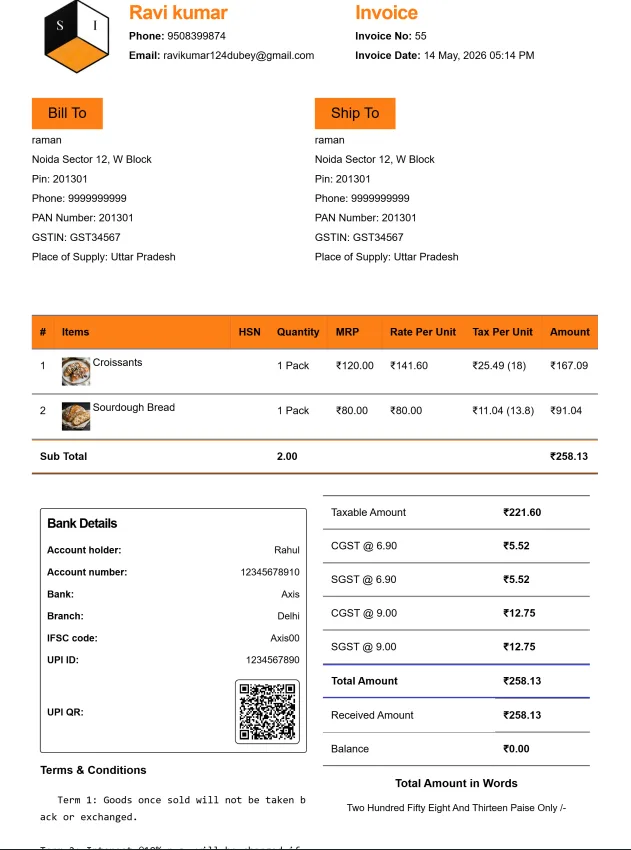
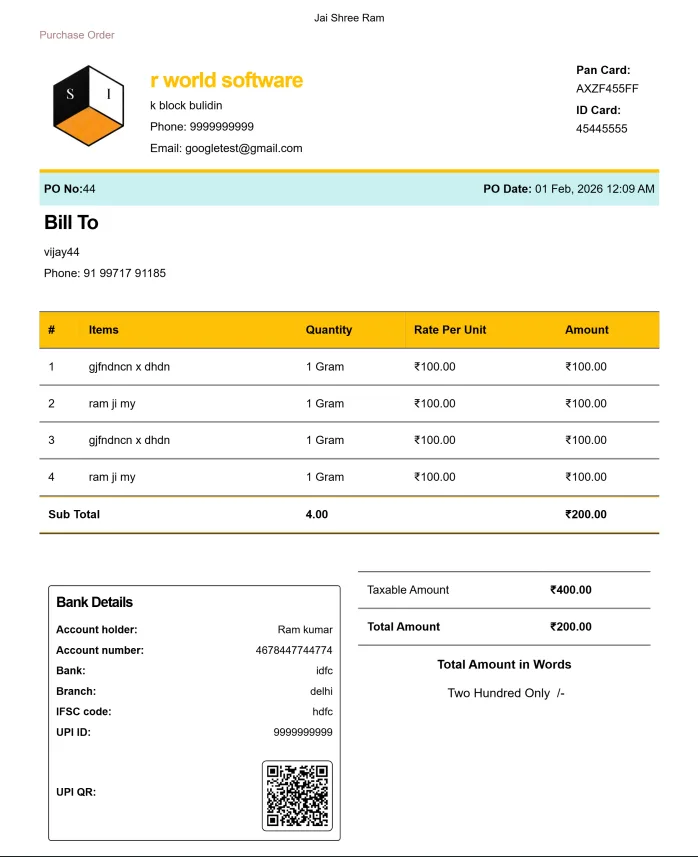
Keep customers, products, candidates or contacts as collections. Pick records, fill the gaps, and EzMe builds the document from your template. Totals and GST can be calculated on your Mac with no AI call at all.
Creative & mediaProduct launch creatives, event invitations, festival and birthday greetings, travel itineraries
Invoice reference layoutPurchase order reference layout
Everything inside
The full feature list.
Version 3.38, grouped by what you are trying to do.
Expand anywhere
Backslash popup in any app, with live search as you type
Type the full key plus Space to expand instantly
Mini J picker panel for choosing shortcuts
Popup themes, and a popup you can move back to its default position
Copy a shortcut command, or paste its attached media directly
Built-in calculator with percentages, powers and square roots
Live values: date, time, weekday, UUID, clipboard and world clocks for London, New York, Tokyo and more
Organise and import
Collections with automatic categories you can change or extend
Hide, unhide, rename or delete collections; hidden ones leave search and expansion
Move, share or delete many shortcuts at once
Bulk rename by codes, codes and names, spaces to hyphens or sequential numbering
Bulk import phrase lists, and export them as CSV
Create a shortcut from your clipboard with the floating + button, whether it is text, an image or files
Launch desktop apps and open saved websites by typing their key
Media shortcuts
Attach images, audio, video and files to any shortcut
Import up to 10 media files at once and give each its own shortcut
Download media from direct URLs and attach it automatically (500 MB per file limit)
Starter packs such as Everyday Emoticons and eight animated GIF reactions
Crop screen to capture a region and load it into the resizer
Copy media to the clipboard and paste it into your app
AI builders
Collection Builder: describe a topic, research it with web search, review the draft, then add it to your shortcuts
AppBuilder: reusable actions with prompts, variables, calculated fields and editable templates
Attach visual reference templates so AI follows your layout
Improve a prompt with AI before generating
Generate a polished page as HTML, or a PDF with table grids
App cover images and cover videos generated from the app's name and description
Saved model profiles for OpenAI, Google Gemini, Anthropic Claude and OpenAI-compatible providers
Writing help
Rewrite clipboard text in a tone you choose, then paste it back
Rephrase prompts for clarity and grammar in a chosen style
Voice input and dictation for builder prompts and details
Voice search assistant for finding shortcuts
Rich template editor with bold, italic, underline, signature lines and tables
Fill missing details in a short popup before generating
Ez Studio
Image Studio: generate images with an OpenAI or Google Gemini image model
Media Resizer: aspect ratio and exact dimensions; save as a file, replace the source or save as a shortcut
Video Cutter: trim a clip and save it to the Desktop or as a shortcut
File Renamer for tidying batches of media files
Video generation through a Google Gemini profile
EzMe Browser
Tabs, named tab groups and a favourites start page
Save any page to Favourites with a note on why you saved it
Import Google Chrome bookmarks, from an HTML export or a profile
Create browser collections from your saved pages
Magnifier lens and a mode that hides tabs and the address bar
Private Mode protected by a six-digit passcode
Marketplace and sharing
Starter collections you can add free and edit to sound like you
Package your own collection as a shareable .zip, with an optional asking price in rupees
Import shortcut or collection packages from others
Share through the macOS share sheet, or paste straight into WhatsApp
Your Genie scorecard shows how often you use backslash shortcuts
Accounts and data
Local accounts with no email or phone; each user gets a separate library
Password and API keys stored in macOS Keychain
Backup and restore of a profile and its media, to move it to another Mac
Usage counters stay on the Mac, per account
Guided walkthrough tour and an in-app help guide
Privacy and permissions
Asks only for what a feature needs.
macOS will prompt for each permission the first time a related feature is used. Text stays on your Mac unless you paste it into another app or send it to an AI provider you configured.
Accessibility
Lets the popup find the app you were typing in and enter text there.
Automation
Expands shortcuts inside other apps.
Screen recording
Captures only the area you select when you choose Crop screen.
Microphone
Used only when you pick voice input for prompts and details.
Speech recognition
Turns that voice input into text.
Get EzMe
Ready when you are.
Download the Mac app, create a local account in under a minute, and type your first backslash.
First launch: unzip, drag EzMe to Applications, then right-click it and choose Open. If macOS says it cannot verify the app, this is the step that lets it start.
Hear about new releases.
Leave your email and a line about how you would use EzMe. We store only what you enter here.